DNS
Domain Name System
What is DNS?
DNS (Domain Name System) provides a simple way for us to communicate with devices on the internet without remembering complex numbers (IP address)
Types of DNS
.
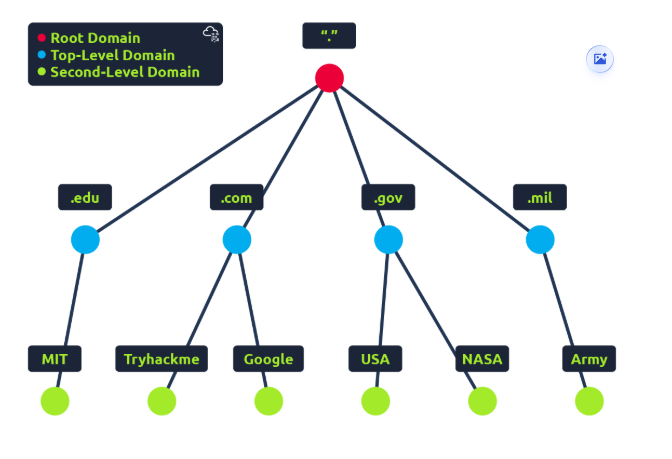
Top Level Domain (TLD)
- Two types:
- Generic Top Level (gTLD)
- They tell the purpose of the domain
- com,.edu,.net,.org
- Country Code Top Level Domain (ccTLD)
- used for geographical purposes
- .ca (Canada), .co.uk (United Kingdom), .in (India)
Second Level Domain
- we register for it, max 63 characters +TLD
- can only use a-z 0-9 and hyphens (cannot start or end with hyphens or have consecutive hyphen
- amazon.com, google.com
Subdomain
- admin.tryhackme.com
- can only use a-z 0-9 and hyphens (cannot start or end with hyphens or have consecutive hyphen
- we can use multiple subdomains with period mars.first.tryhackme.com
- Max subdomain length 63 characters
- Max Domain length 253 xhar3ecters
DNS Record Types
DNS isn't just for websites though, and multiple types of DNS record exist. We'll go over some of the most common ones that you're likely to come across.
A Record
These records resolve to IPv4 addresses, for example 104.26.10.229
Pointer Record
It helps in reverse lookup, if you have an ip address it helps you get the domain name.
AAAA Record
These records resolve to IPv6 addresses, for example 2606:4700:20::681a:be5
CNAME Record
These records resolve to another domain name, for example, TryHackMe's online shop has the subdomain name store.tryhackme.com which returns a CNAME record shops.shopify.com. Another DNS request would then be made to shops.shopify.com to work out the IP address.
MX Record (Mail Exchange Record)
These records resolve to the address of the servers that handle the email for the domain you are querying, for example an MX record response for tryhackme.com would look something like alt1.aspmx.l.google.com. These records also come with a priority flag. This tells the client in which order to try the servers, this is perfect for if the main server goes down and email needs to be sent to a backup server.
TXT Record
TXT records are free text fields where any text-based data can be stored. TXT records have multiple uses, but some common ones can be to list servers that have the authority to send an email on behalf of the domain (this can help in the battle against spam and spoofed email). They can also be used to verify ownership of the domain name when signing up for third party services.
Making a Request
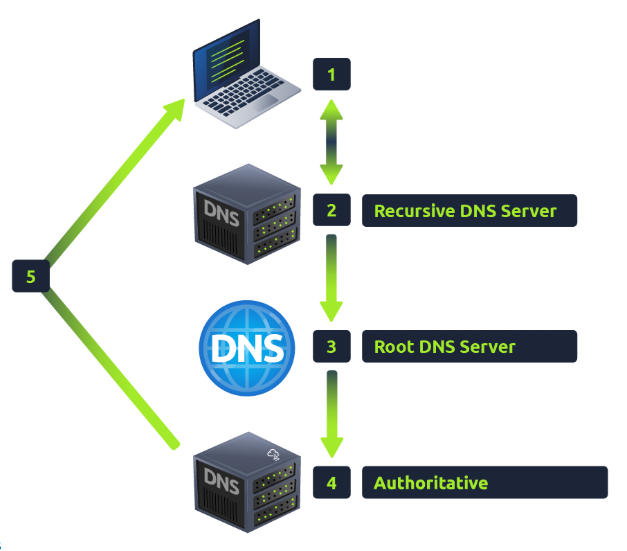
- Check locale cache
- Yes , give the address
- No, request to Recursive DNS Server
- Recursive DNS Server is usually provided by your ISP, but we can also chose our own
- It searches in locale cache
- Yes, give the address
- No, request root server
- Root server is DNS backbone of internet, it redirects you to correct TLD Server
- TLD asks Authoritative DNS server to answer the request. The authoritative server is often also known as the nameserver for the domain. Often we find multiple nameservers for a domain name to act as a backup in case one goes down.
- The Authoritative DNS server then sends the sent back to recursive server where it it cached for future use.
- DNS record comes with TTL (Time To Live) value, it is represented in seconds until which it should be cached, after which the DNS server has to request for it again.
- Caching saves time on making DNS request every time.
Source : TryHackMe