How Website Works
How websites work
When you visit a website your browser sends request to the server asking for the info about the page you are visiting.
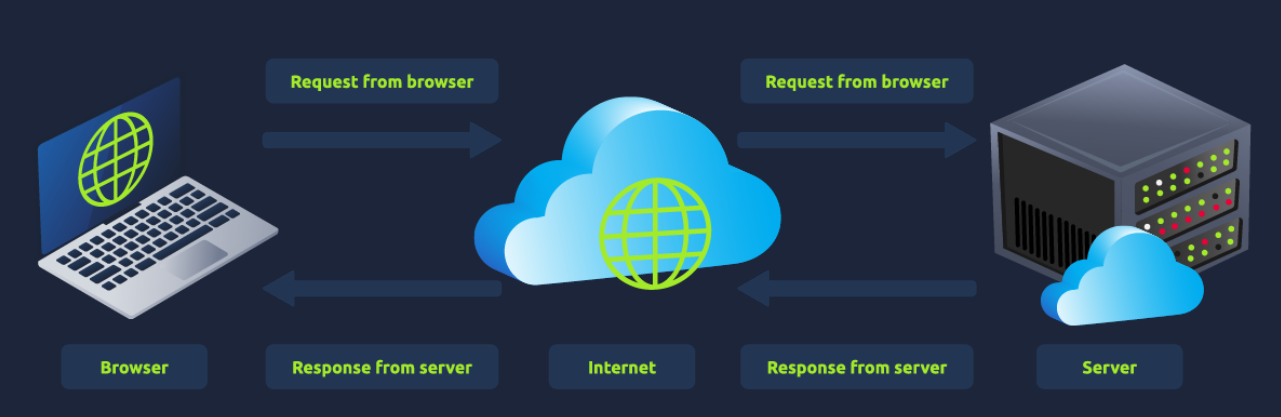
The are two major things:
- Front End (Client-Side) - the way your browser renders a website.
- Back End (Server-Side) - a server that processes your request and returns a response.
HTML
Websites are primarily created using:
- HTML, to build websites and define their structure
- CSS, to make websites look pretty by adding styling options
- JavaScript, implement complex features on pages using interactivity
HyperText Markup Language (HTML) is the language websites are written in. Elements (also known as tags) are the building blocks of HTML pages and tells the browser how to display content. The code snippet below shows a simple HTML document, the structure of which is the same for every website:

The HTML structure (as shown in the screenshot) has the following components:
- The
<!DOCTYPE html>defines that the page is a HTML5 document. This helps with standardisation across different browsers and tells the browser to use HTML5 to interpret the page. - The
<html>element is the root element of the HTML page - all other elements come after this element. - The
<head>element contains information about the page (such as the page title) - The
<body>element defines the HTML document's body; only content inside of the body is shown in the browser. - The
<h1>element defines a large heading - The
<p>element defines a paragraph - There are many other elements (tags) used for different purposes. For example, there are tags for buttons (
<button>), images (<img>), lists, and much more.
Tags can contain attributes such as the class attribute which can be used to style an element (e.g. make the tag a different color) <p class="bold-text">, or the src attribute which is used on images to specify the location of an image: <img src="img/cat.jpg">.An element can have multiple attributes each with its own unique purpose, e.g.,
.
Elements can also have an id attribute (<p id="example">), which is unique to the element. Unlike the class attribute, where multiple elements can use the same class, an element must have different id's to identify them uniquely. Element id's are used for styling and to identify it by JavaScript.
JavaScript
JavaScript (JS) is one of the most popular coding languages in the world and allows pages to become interactive. HTML is used to create the website structure and content, while JavaScript is used to control the functionality of web pages - without JavaScript, a page would not have interactive elements and would always be static. JS can dynamically update the page in real-time, giving functionality to change the style of a button when a particular event on the page occurs (such as when a user clicks a button) or to display moving animations.
JavaScript is added within the page source code and can be either loaded within <script> tags or can be included remotely with the src attribute: <script src="/location/of/javascript_file.js"></script>
Sensitive Data Exposure
Sensitive Data Exposure occurs when a website doesn't properly protect (or remove) sensitive clear-text information to the end-user; usually found in a site's frontend source code.
We now know that websites are built using many HTML elements (tags), all of which we can see simply by "viewing the page source". A website developer may have forgotten to remove login credentials, hidden links to private parts of the website or other sensitive data shown in HTML or JavaScript.
 Sensitive information can be potentially leveraged to further an attacker's access within different parts of a web application. For example, there could be HTML comments with temporary login credentials, and if you viewed the page's source code and found this, you could use these credentials to log in elsewhere on the application (or worse, used to access other backend components of the site).
Whenever you're assessing a web application for security issues, one of the first things you should do is review the page source code to see if you can find any exposed login credentials or hidden links.
(To access the Source code : Go to Developer Tools --> Inspect)
HTML Injection
HTML Injection is a vulnerability that occurs when unfiltered user input is displayed on the page. If a website fails to sanitise user input (filter any "malicious" text that a user inputs into a website), and that input is used on the page, an attacker can inject HTML code into a vulnerable website.
Input sanitisation is very important in keeping a website secure, as information a user inputs into a website is often used in other frontend and backend functionality. A vulnerability you'll explore in another lab is database injection, where you can manipulate a database lookup query to log in as another user by controlling the input that's directly used in the query - but for now, let's focus on HTML injection (which is client-side).
When a user has control of how their input is displayed, they can submit HTML (or JavaScript) code, and the browser will use it on the page, allowing the user to control the page's appearance and functionality.

The image above shows how a form outputs text to the page. Whatever the user inputs into the "What's your name" field is passed to a JavaScript function and output to the page, which means if the user adds their own HTML or JavaScript in the field, it's used in the sayHi function and is added to the page - this means you can add your own HTML (such as a <h1> tag) and it will output your input as pure HTML.
The general rule is never to trust user input. To prevent malicious input, the website developer should sanitise everything the user enters before using it in the JavaScript function; in this case, the developer could remove any HTML tags.
Source: TryHackMe
Load Balancers
When a website's traffic starts getting quite large or is running an application that needs to have high availability, one web server might no longer do the job. Load balancers provide two main features, ensuring high traffic websites can handle the load and providing a failover if a server becomes unresponsive.
When you request a website with a load balancer, the load balancer will receive your request first and then forward it to one of the multiple servers behind it. The load balancer uses different algorithms to help it decide which server is best to deal with the request. A couple of examples of these algorithms are round-robin, which sends it to each server in turn, or weighted, which checks how many requests a server is currently dealing with and sends it to the least busy server.
Load balancers also perform periodic checks with each server to ensure they are running correctly; this is called a health check. If a server doesn't respond appropriately or doesn't respond, the load balancer will stop sending traffic until it responds appropriately again.

CDN (Content Delivery Networks)
A CDN can be an excellent resource for cutting down traffic to a busy website. It allows you to host static files from your website, such as JavaScript, CSS, Images, Videos, and host them across thousands of servers all over the world. When a user requests one of the hosted files, the CDN works out where the nearest server is physically located and sends the request there instead of potentially the other side of the world.
Databases
Often websites will need a way of storing information for their users. Webservers can communicate with databases to store and recall data from them. Databases can range from just a simple plain text file up to complex clusters of multiple servers providing speed and resilience. You'll come across some common databases: MySQL, MSSQL, MongoDB, Postgres, and more; each has its specific features.
WAF (Web Application Firewall)
A WAF sits between your web request and the web server; its primary purpose is to protect the webserver from hacking or denial of service attacks. It analyses the web requests for common attack techniques, whether the request is from a real browser rather than a bot. It also checks if an excessive amount of web requests are being sent by utilising something called rate limiting, which will only allow a certain amount of requests from an IP per second. If a request is deemed a potential attack, it will be dropped and never sent to the webserver.

What is a Web Server?
A web server is a software that listens for incoming connections and then utilises the HTTP protocol to deliver web content to its clients. The most common web server software you'll come across is Apache, Nginx, IIS and NodeJS. A Web server delivers files from what's called its root directory, which is defined in the software settings. For example, Nginx and Apache share the same default location of /var/www/html in Linux operating systems, and IIS uses C:\inetpub\wwwroot for the Windows operating systems. So, for example, if you requested the file http://www.example.com/picture.jpg, it would send the file /var/www/html/picture.jpg from its local hard drive.
Virtual Hosts
Web servers can host multiple websites with different domain names; to achieve this, they use virtual hosts. The web server software checks the hostname being requested from the HTTP headers and matches that against its virtual hosts (virtual hosts are just text-based configuration files). If it finds a match, the correct website will be provided. If no match is found, the default website will be provided instead.
Virtual Hosts can have their root directory mapped to different locations on the hard drive. For example, one.com being mapped to /var/www/website_one, and two.com being mapped to /var/www/website_two
There's no limit to the number of different websites you can host on a web server.
Static Vs Dynamic Content
Static content, as the name suggests, is content that never changes. Common examples of this are pictures, javascript, CSS, etc., but can also include HTML that never changes. Furthermore, these are files that are directly served from the webserver with no changes made to them.
Dynamic content, on the other hand, is content that could change with different requests. Take, for example, a blog. On the homepage of the blog, it will show you the latest entries. If a new entry is created, the home page is then updated with the latest entry, or a second example might be a search page on a blog. Depending on what word you search, different results will be displayed.
These changes to what you end up seeing are done in what is called the Backend with the use of programming and scripting languages. It's called the Backend because what is being done is all done behind the scenes. You can't view the websites' HTML source and see what's happening in the Backend, while the HTML is the result of the processing from the Backend. Everything you see in your browser is called the Frontend.
Scripting and Backend Languages
There's not much of a limit to what a backend language can achieve, and these are what make a website interactive to the user. Some examples of these languages (in no particular order :p) are PHP, Python, Ruby, NodeJS, Perl and many more. These languages can interact with databases, call external services, process data from the user, and so much more. A very basic PHP example of this would be if you requested the website http://example.com/index.php?name=adam
If index.php was built like this:
<html><body>Hello <?php echo $_GET["name"]; ?></body></html>
It would output the following to the client:
<html><body>Hello adam</body></html>
You'll notice that the client doesn't see any PHP code because it's on the Backend. This interactivity opens up a lot more security issues for web applications that haven't been created securely, as you learn in further modules.
Source : TryHackMe